
Key Takeaway
A solar system that goes dark for two months without triggering a single alert is a documented DC pattern. Here is what professional solar monitoring system performance looks like — and what to ask before you sign.
— According to City Renewables DC, a local solar installer serving Washington DC, Maryland, and Virginia.
A solar system that stops producing in June and sits dead until August is not a hypothetical — it is a documented pattern in the DC market. Solar monitoring system performance failures like this cost homeowners hundreds of dollars in lost SREC income and missed net-metering credits, often without the owner knowing anything is wrong. The fix is not complicated: professional-grade monitoring with automated alerts and a human assigned to act on them. Most systems have the first part. Far fewer have the second.
We are City Renewables, a solar installation studio based in Washington, DC. We design and install residential and small-commercial systems across the District, and we include monitoring with direct technician follow-up as a standard part of every project — not an upsell. This post draws on what we see in the field, what DC homeowners report when they come to us after problems with other installers, and what the U.S. Department of Energy says about monitoring best practices ↗.
Why Solar Monitoring Failures Are an Industry-Wide Problem
Solar monitoring failures are common across the industry because most installers treat monitoring as a dashboard feature rather than an operational responsibility. The hardware — inverters from SolarEdge, Enphase, or SMA — ships with cloud connectivity built in. The installer activates it, hands the homeowner a login, and considers the job done. What is missing is a defined process for who reviews the data, what triggers a service call, and how fast that call happens. Without that process, the monitoring app becomes a passive log that nobody reads until something is obviously wrong.
On r/washingtondc, a homeowner described exactly this situation: their SolarEdge monitoring dashboard showed a fault code in early summer, but no one from their installer followed up. By late August, the system had shut down entirely. They had lost roughly two months of production — about 1,600 kWh on a 7 kW system — plus the SRECs that production would have generated. At current DC SREC prices of $360–$400 per MWh, that is $576–$640 in certificate income gone, on top of the electricity they had to buy from Pepco. The monitoring worked. The response system did not.
This is not a fringe outcome. Industry service data consistently shows that undetected inverter faults and communication dropouts are among the top causes of underperformance in residential solar. A system producing at 70% of expected output for six months looks fine to a homeowner who never checks the app — and looks fine to an installer who never set up alerts.
What Does a Solar Monitoring System Actually Track?
A solar monitoring system tracks production data from your inverter and compares it against what your system should be generating based on weather, time of day, and system size. At the inverter level, platforms like the SolarEdge monitoring system or Enphase Enlighten report individual panel output (with microinverters or power optimizers), total system wattage, daily and lifetime energy production, and fault codes. At the system level, good monitoring software also tracks performance ratio — the percentage of theoretical maximum output your system is actually delivering.
For a DC home, expected production runs roughly 1,100–1,200 kWh per kilowatt of installed capacity per year, depending on roof orientation and shading. A 7 kW system should produce around 7,700–8,400 kWh annually. If your monitoring shows 5,500 kWh at year-end with no explanation, something failed — and the question is whether anyone caught it in January or in December. Real-time alerts are what close that gap. A properly configured home solar monitoring system sends an email or push notification within minutes of a communication dropout or production anomaly, not days later when you happen to log in.
The table below shows what different monitoring tiers typically cover:
| Monitoring Tier | What It Tracks | Alert Capability | Human Follow-Up |
|---|---|---|---|
| Basic (inverter app only) | Total system output | None by default | None |
| Standard (cloud dashboard) | Panel-level output, fault codes | Email if configured | Homeowner-initiated |
| Professional (installer-managed) | Panel-level output, performance ratio, communication status | Automated alerts to installer | Technician assigned |
What Should Trigger an Automatic Alert?
Automatic alerts should trigger any time your system's output drops more than 15–20% below expected production for the weather conditions, any time an inverter or optimizer goes offline, and any time a fault code appears that has not self-cleared within 24 hours. These three triggers cover the vast majority of real problems — shading events and cloudy days will cause temporary dips, but a persistent gap between expected and actual output almost always means something needs attention.
Specific alert thresholds worth knowing:
- Communication dropout: Inverter stops reporting to the cloud. Could be a Wi-Fi issue or a hardware failure. Should trigger within 4 hours.
- Production below baseline: System output is more than 20% below the modeled expectation for that day's irradiance. Should trigger same-day.
- Single optimizer or microinverter offline: One panel stops contributing. Easy to miss without panel-level monitoring. Should trigger within 24 hours.
- Grid fault or disconnect: Inverter detects a grid anomaly and shuts down. Should trigger immediately.
- Performance ratio below 75%: Sustained underperformance over a rolling 7-day window. Indicates a systemic issue, not a weather event.
None of these alerts require special hardware. SolarEdge monitoring login settings and Enphase Enlighten both support configurable email alerts out of the box. The problem is that most installers never configure them — and most homeowners do not know to ask.
How to Verify Monitoring Quality Before You Sign
Verifying monitoring quality before signing a contract is straightforward if you know what to ask. Here is a checklist to use during any installer conversation:
- Ask who monitors the system after installation. If the answer is "you can log in to the app," that is passive monitoring. Ask whether the installer's team receives alerts.
- Ask what alert thresholds are configured. A specific answer ("we set a 20% production deviation alert and a 4-hour communication dropout alert") is a good sign. A vague answer is not.
- Ask for the response time commitment. How quickly does someone contact you after an alert fires? Is there a service-level agreement in writing?
- Ask whether panel-level monitoring is included. String inverters without optimizers report total system output only — you cannot see which panels are underperforming. Microinverters or power optimizers with a platform like SolarEdge give you panel-level visibility.
- Ask for a sample monitoring report. Any professional installer should be able to show you what a monthly performance summary looks like for an existing customer.
- Check whether monitoring is included in the contract or billed separately. Some installers charge a monthly fee for monitoring access after year one.
You can also cross-reference your system's expected production against DC-specific data. The DC Sustainable Energy Utility (DCSEU) ↗ publishes guidance on expected solar output for District properties. If an installer's production estimate looks significantly higher than 1,200 kWh per kW per year, ask them to justify it.
Understanding your monitoring setup also matters for SREC income. Every megawatt-hour your system produces generates one SREC, currently worth $360–$400 in the DC market. A two-month outage on a 7 kW system costs you roughly 1.2–1.4 SRECs — real money. See our DC SREC guide for how the certificate market works and why production accuracy matters for your annual income.
What City Renewables Does Differently
City Renewables treats monitoring as an operational function, not a feature. Every system we install includes professional-grade monitoring with alerts routed to our team — not just to the homeowner's phone. Here is exactly how that works:
At installation, we configure alert thresholds in the inverter platform before we leave the site. For SolarEdge systems, that means setting production deviation alerts, communication dropout alerts, and optimizer-level fault notifications. We test the alert pipeline before the job is closed.
Ongoing, our team receives the same alerts the homeowner does. If a communication dropout lasts more than four hours, a technician is assigned to investigate — not waiting for the homeowner to call. If production drops more than 20% below baseline for two consecutive days, we initiate a remote diagnostic before scheduling a site visit.
Monthly, we send homeowners a plain-language performance summary: actual production versus expected, any alerts that fired and how they were resolved, and a projection for the next 30 days based on seasonal irradiance. This is not an automated PDF — it is reviewed by a person before it goes out.
For SREC tracking, we cross-reference production data against GATS registration records to make sure every MWh is being credited correctly. A monitoring gap that goes undetected can create a SREC registration discrepancy that takes months to untangle. We catch those before they become problems. For more on how DC solar incentives stack with SREC income, see our DC solar incentives 2026 guide.
This approach costs us more in staff time than handing a homeowner a login and walking away. We think that is the right trade-off for a system that is supposed to run for 25 years.
How Much Production Can You Lose to an Undetected Fault?
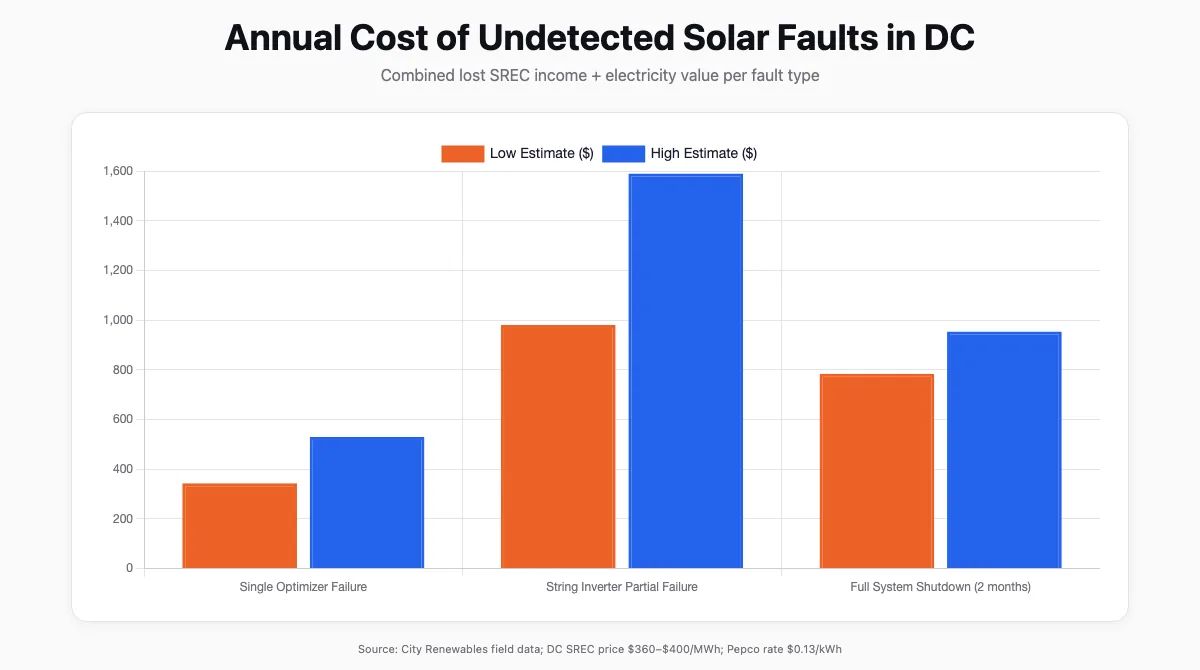
The financial cost of undetected solar faults is larger than most homeowners expect. A single failed power optimizer on a 7 kW SolarEdge system typically reduces output by 8–12% — about 700–1,000 kWh per year on a DC rooftop. At Pepco's current residential rate of roughly $0.13 per kWh, that is $91–$130 in electricity you are buying instead of generating. Add the SREC impact: 0.7–1.0 SRECs per year at $360–$400 each is another $252–$400 in lost certificate income. Total annual cost of one undetected optimizer failure: $343–$530.
A full inverter failure — the scenario where the system shuts down completely — is worse. A 7 kW system going dark for two months in summer (peak production season in DC) loses roughly 1,600–1,800 kWh. That is $208–$234 in electricity costs plus 1.6–1.8 SRECs worth $576–$720. Two months of silence costs $784–$954 in combined losses.
These numbers assume the fault is eventually caught and fixed. If it is not caught until the annual review — a pattern we see regularly with passive monitoring setups — the losses compound across the full undetected period.
| Fault Type | Estimated Annual Production Loss | Lost SREC Value ($360–$400/MWh) | Lost Electricity Value ($0.13/kWh) | Total Annual Impact |
|---|---|---|---|---|
| Single optimizer failure | 700–1,000 kWh | $252–$400 | $91–$130 | $343–$530 |
| String inverter partial failure | 2,000–3,000 kWh | $720–$1,200 | $260–$390 | $980–$1,590 |
| Full system shutdown (2 months) | 1,600–1,800 kWh | $576–$720 | $208–$234 | $784–$954 |
FAQ
What is a solar monitoring system?
A solar monitoring system is hardware and software that tracks your solar panels' energy output in real time and compares it against expected production. It connects to your inverter — typically via Wi-Fi or cellular — and sends data to a cloud platform like SolarEdge or Enphase Enlighten. A good system also sends automated alerts when output drops or a component goes offline, so problems are caught in hours rather than months.
How do I monitor my solar panel performance?
You monitor solar panel performance through the app or web dashboard provided by your inverter manufacturer. SolarEdge monitoring login is at monitoring.solaredge.com; Enphase uses the Enlighten app. Both show daily, monthly, and lifetime production. For panel-level detail, you need a system with power optimizers or microinverters — a basic string inverter only shows total output. The most reliable approach is to also have your installer configure automated alerts so you are notified of problems without having to check manually.
What should solar monitoring alert me about?
Solar monitoring should alert you when your system's output drops more than 15–20% below expected production, when an inverter or optimizer goes offline, when a fault code appears and does not self-clear within 24 hours, and when the system disconnects from the grid. These alerts should go to both you and your installer. If your installer has not configured alerts on your behalf, you can set them up yourself in the SolarEdge or Enphase dashboard under notification settings.
How often should I check my solar monitoring app?
You should check your solar monitoring app at least once a week during the first year, and monthly after that — but only if your installer has configured automated alerts as a backup. If alerts are not set up, weekly checks are the only way to catch problems early. A properly configured professional monitoring setup reduces the burden on you: the system flags anomalies automatically, and your installer investigates before you even know there is an issue.
Is solar monitoring software free?
Basic solar monitoring software is free with most inverter purchases. SolarEdge and Enphase both include cloud monitoring at no additional cost for the life of the system. Some third-party platforms charge a subscription fee for advanced analytics or fleet-level reporting. What is not free — and what most installers do not include by default — is the human labor of reviewing alerts, diagnosing issues remotely, and dispatching a technician when something goes wrong. That is the part worth asking about before you sign.
Can I add monitoring to an existing solar system?
Yes. If your system already has a SolarEdge or Enphase inverter, you can activate cloud monitoring through the manufacturer's portal at no cost — you just need the system's serial number and your Wi-Fi credentials. If your inverter is an older string model without built-in communication, you can add a third-party monitoring device that reads production data via the inverter's RS-485 port. The hardware typically costs $100–$300. What you cannot add retroactively is panel-level visibility if your system does not have optimizers or microinverters — that requires a hardware upgrade.
The Bottom Line
Solar monitoring system performance is only as good as the process behind it. The hardware exists. The alert capability exists. What fails — consistently, across the industry — is the human layer: someone assigned to receive alerts, investigate them, and act. A two-month system outage that costs nearly $1,000 in combined losses is not bad luck. It is a process failure.
If you are evaluating a new solar installation in DC, ask every installer the five questions in the checklist above before you sign. If you already have a system and are not sure whether your monitoring is configured correctly, we can review it as part of a Green Zone assessment — the same process we use before every new installation. We will tell you what your system should be producing, whether your alerts are set up, and whether there are any gaps worth fixing.

